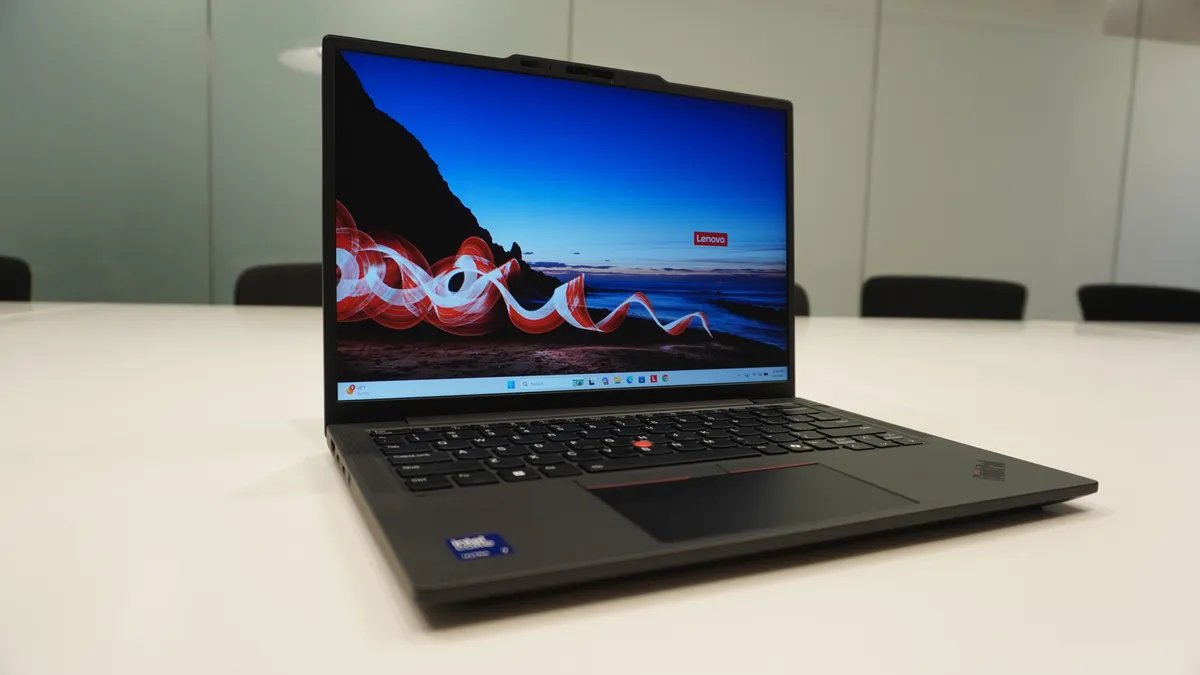

Lenovo ThinkPad X13 (Gen 6)
ZDNET's key takeaways
- The sixth-gen ThinkPad X13 is available now for $1,569.
- At 2.0 pounds, it's one of the lightest laptops I've tested all year, with a fantastic battery that charges in the blink of an eye.
- It's pricey, the display is just average, and the keyboard/trackpad might feel too cramped for some.
Follow ZDNET: Add us as a preferred source on Google.
We're big fans of the ThinkPad here at ZDNET, reviewing several models across the different series each year. It's quite an extensive catalog at this point, from the powerful P series to the affordable E series to the thin and light X series. So if you forget how to tell them apart, I don't blame you.
Also: I've tested dozens of ThinkPads: Here's the Lenovo model I keep coming back to
The X1 Carbon is arguably the ThinkPad's flagship model, and most premium in terms of design. But it's expensive, relegating itself to the upper tier of the market as an “executive-tier” device.
Enter: the ThinkPad X13 (Gen 6), Lenovo's answer to a more accessible ultraportable ThinkPad, with some of the best features of the X1 Carbon but at half the price in a battery-efficient, high-performing package.
Best laptop deals of the week
Deals are selected by the CNET Group commerce team, and may be unrelated to this article.
Armed with an Intel Core Ultra 7 255 U-series processor (Intel's most power-efficient chips), the sixth-gen X13 is designed for users who need extreme portability without a whole lot of performance trade-offs. Weighing just 2.05 pounds, it's certainly one of the lightest laptops I've tested over the last year, with a solid build that passes the one-finger test, and just enough ports for the average professional.
The ThinkPad X13 Generation 6 is a quintessential ThinkPad with a black-and-red body, TrackPoint, and physical right and left buttons above the trackpad, but… in miniature. Its 13.3-inch IPS display isn't anything groundbreaking, but the 400-nit, WUXGA (1920×1200) resolution is crisp, glare-resistant, and easy to work on. The integrated Intel graphics round out its business-forward mission.
Similarly, while the keyboard isn't particularly cramped, the trackpad might be for some people. At 4.5 inches long and around 2.5 inches deep, it's dwarfed by trackpads on larger ThinkPads like the P1 Gen 8, which is nearly 6 inches across. Although this is the same size as found on other 14-inch ThinkPads, it's still on the small side in my opinion, and something to keep in mind.
In terms of physical design, however, these two things are the biggest trade-offs for the laptop's diminutive size. With support for up to 64GB of soldered LPDDR5x memory and 2TB of local storage, the hardware is certainly on par with its larger siblings, including models with the Intel or AMD Ryzen AI Pro 300-series chips.
Also: The Lenovo ThinkPad streak is over – this model breaks a decade-long trend in the best way yet
For everyday users, connectivity is sufficient, with two Thunderbolt 4 USB-C ports supporting PD 3.0 and DisplayPort 2.1, one HDMI port that supports an external monitor at 4K and 60Hz refresh rate, a 5Gbps USB-A port, and a headphone jack.
Unlike other ThinkPads in the X1 series, the speakers on the X13 are upward-facing and placed on either side of the keyboard. This results in audio that's certainly loud and clear, but rather hollow and lacking in bass.
This kind of audio profile is more ideal for voice calls, webinars, and videoconferencing, use cases more aligned with its business on-the-go use case. The 5MP RGB camera is of good quality, providing a clear, sharp image even in less-than-ideal lighting conditions in my testing.
As a grab-and-go laptop for mobile professionals, its top quality is — you guessed it — its battery. This thing has fantastic battery life, lasting well over a full workday and easily into the next. When idle, battery life drops to a trickle, and long-lasting video calls (that could have been an email) barely tax it.
Also: I recommend this low-cost ThinkPad to most professionals
The 54.7Wh battery and U-series Intel Core Ultra 7 255 processor work together to deliver a cool, quiet power profile that runs quietly unless under a demanding workload.
This is followed by the fact that it supports rapid charging, reaching 80% in an hour with a 65W charger or higher. This is one of those features I hear users complain about: rapid charging often requires heftier chargers at 100W or higher. If you don't have one of these on hand, you'll get a “low charger” message and won't be able to take advantage of the feature.
Not something you'll likely run into here, as most chargers in the wild are at least 65W (as is the charger it comes with), so you'll almost always be able to charge at this expedited rate. In my testing, I found this to be accurate, increasing from 5% to 77% in a little under an hour.
Also: A week with Lenovo's most powerful ThinkPad changed how I think about work laptops
All in all, the X13 pushes the boundaries of portability for the ThinkPad line, representing the far end of the spectrum while maintaining everything else that defines it. If you want a capable 13-inch workhorse that you'll have no problems toting around town, this is the laptop for you. That said, as a business-minded ThinkPad, it's not exactly cheap, hovering around the $1,500 mark for the 16GB version: a price that requires commitment to the brand.
ZDNET's buying advice
Of all the ultraportable laptops we've tested over the last few years, the Lenovo ThinkPad X13 exudes reliability with a premium hardware profile and tried-and-true physical form. There are no gimmicks here; this is a ThinkPad through and through, well-suited to business users who demand portability and a fantastic battery life.
I'd recommend the X13 to users who want a really light laptop but aren't keen on experimental form factors or lower-end hardware. While the display is just average and potentially too small for some, it's backed up by solid hardware. In that sense, the X13 brings more muscle than competing ultraportables like the Asus Zenbook A14 or the Surface Pro 12-inch.