
ZDNET's key takeaways
- The RayNeo X3 Pro smart glasses will be available December 17th for $1,099, with trade-in offers.
- The color displays look great, the UI is easy to learn, and the glasses are comfortable.
- Battery life is poor, the glasses are thick, and the smartphone connectivity is spotty at this early stage of development.
Follow ZDNET: Add us as a preferred source on Google.
Regular readers know that I am a daily user of XR glasses because they extend my single laptop display into multiple large virtual monitors. I recently purchased the Meta Ray-Ban Display glasses, and they've been one of my favorite pairs for their ability to bring advanced features to the form factor.
But for the past month, I've been testing RayNeo's version of smart glasses with heads-up displays: the RayNeo X3 Pro smart glasses, and they're like looking into the future (despite not being perfect).
Also: I tried the Meta Ray-Ban Display glasses, and they got me excited for the post-smartphone era
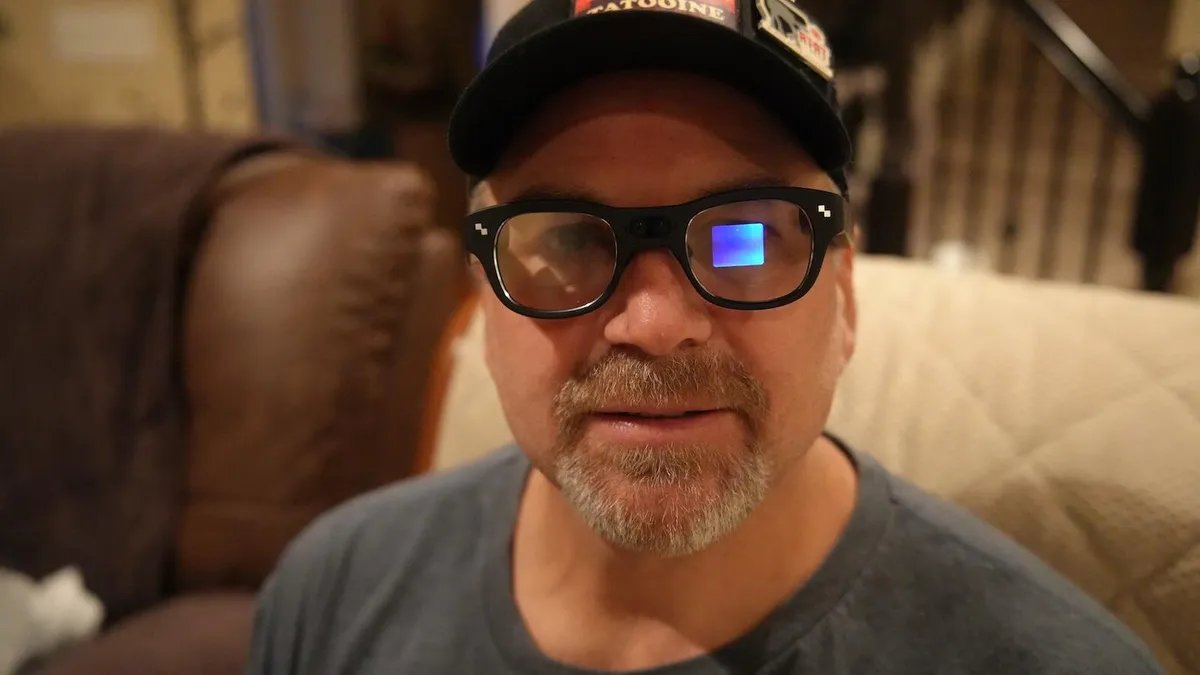
The RayNeo X3 Pro include full color microLED displays in each eye and 3,500 nits of brightness. Add to that a 76 gram weight, dual-camera imaging system, and 38-minute fast charge via USB-C, and you've got a promising product.
Looking at hardware, the color displays are clear and bright in all lighting conditions and I haven't had any issues seeing them. The glasses are powered by a Qualcomm Snapdragon AR1 Gen 1 chipset, which is powerful, but unfortunately hasn't resulted in very good battery life.
I've been getting about one to two hours of battery life, but it's also highly dependent on how active you are with the OS. It's nice that they charge up quickly, but unlike my Meta smart glasses, there is no battery in the case to charge the glasses up on the go. This has been pretty disappointing, but keep in mind that I've been testing an early version of the model.
Physically speaking, the glasses are fairly lightweight and very comfortable to wear. There is ample flex in the sides of the glasses so there is no pressure on your head, and they also don't weigh down on the bridge of your nose.
However, the frames are still rather thick and the cameras are obviously centered on the front, so I do stand out a bit while wearing them on the train and in the office. Physics and available space for technology components will be a major challenge for smart glasses as they attempt to become more commonplace.
On the underside of the right side of the glasses, there's a button to turn on the display when it goes into standby mode. Taps, double taps, and swipes on the right side touch area help you move around through notifications, the home screen, and app launcher. There is also a button on the top right, the action button, that supports taps and long presses for AI recording, to-do list, camera, and translation options.
Also: I wore Google's upcoming Android XR smart glasses, and it's a future I'd actually want to live in
The camera app is well done with a small thumbnail showing what will be captured when you tap to take a photo or video. Viewing photos and videos right on the glasses is also an awesome experience with clear colorful presentation and good audio when viewing videos. The camera is also used with the RayNeo AI function to help tell you about objects in view of the camera.
In addition to the camera and gallery, apps that are part of the RayNeo OS include AI recordings, to-do list, media player (controls music playing from your connected smartphone), 14-language translator, map app for navigation, and phone. These are stand-alone apps, however, and they do not connect to smartphone apps.
You can use ADB and side-load Android apps to the glasses, but I have not yet made that extra effort as I am trying to understand and appreciate the default UI.
Also: This flagship Garmin smartwatch has a satellite feature I wish I found sooner (plus it's on sale)
I have also not been able to get any of the AI recordings, images, or videos synced over to my Apple iPhone 17 Pro Max so they can also be accessed on the glasses at this time. Import buttons are present and WiFi Direct connections are started, but then the import times out every single time.
The camera has been useful for capturing things on the go, and I have found utility with RayNeo AI, powered by Gemini, maps, and the teleprompter. The maps app supports navigation via biking or walking and while not tied to Google Maps, Apple Maps, or other smartphone apps, it is easy to search for a destination and then have the glasses give you heads-up directions. The maps are provided by Here and in my limited testing, have been accurate.
The teleprompter app projects words in the glasses, moving them up higher than the UI so that you can look straight ahead and read the script. Simply use the RayNeo AR smartphone app to enter text into a file in the teleprompter utility and then sync the script to the glasses.
Also: These XR glasses gave me a 200-inch screen to watch TV on – and they're $170 off now
The awesome part of this app is that the intelligent algorithms in the glasses move through your script automatically, even if you skip a word here and there, so you don't have to match a certain timing or progress your script manually. I plan to record some of my YouTube videos using the RayNeo X3 Pro rather than a big iPad teleprompter rig hooked up to my Sony camera with a controller to manually advance my scripts.
The RayNeo press information mentions an Apple Watch app to help control the glasses and I look forward to testing that out, but during my first look phase that app was not yet available.
ZDNET's buying advice
The RayNeo X3 Pro glasses provide a nice glimpse of the future of smart glasses, but they are primarily for early adopters willing to pay a high price for a few select apps. It is encouraging to see the dual display technology in action with excellent clarity, vibrant colors, and some useful tech demonstrations such as the RayNeo AI and smart teleprompter app.
I look forward to the future with improve styling, longer battery life, and improved cross-platform application support, and would be happy to recommend them at that time.